Brand and products
Colours, typefaces and logo
What Nomi puts on a picture, and how to correct it before it does.
Last updated 23 October 2026

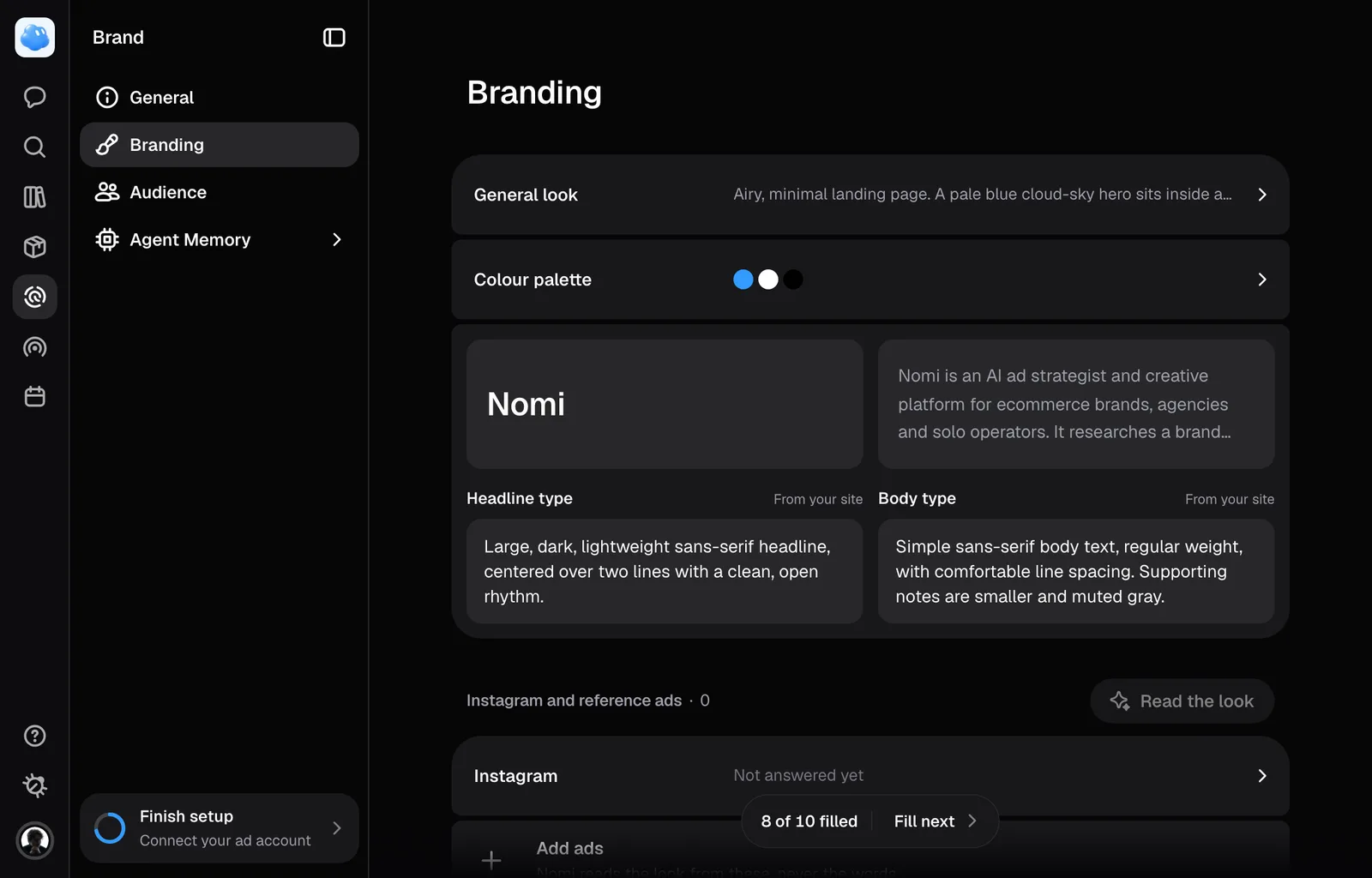
Nomi renders an ad out of words, and the words about how your brand looks live in one place: Branding, a row in the sidebar of the Brand page. It opens on General look, a sentence about the register with the palette under it, then the headline and body type, each over a sample of itself, then Instagram and reference ads, and last Details: buttons, edges, the logo and the rules every render follows.
Your Instagram
Type your brand's Instagram handle under Instagram, in Instagram and reference ads, and press Read the look. Nomi reads your last 24 posts, keeps up to eight that show how your brand looks, adds them to that list marked From Instagram, and reads the look from them, so General look, the palette and the type fields above fill in. If setup found the handle on your website, it is already there, marked From your site, and setup has read the feed once already.
Reading the feed again replaces the posts it kept the last time and never touches ads you added yourself. Posts Nomi makes for your brand afterwards look like the ones it kept. The account has to be public: Nomi cannot read a private or restricted one, and says so.
A read takes about a minute, calls a model and spends credits, about 3.
Colours
The palette is a row of swatches, each one a colour you can see rather than a word like "sage". Click a swatch to change it, click the dashed tile beside them to add one.
Each colour can carry a role: Background, Primary, Accent, Text or CTA. A colour with no role is allowed, and it is also weaker. Four bare colours reach the model as four bare colours, and nothing in them says which one is the button.
These are also the colours Settings offers when you pick an accent for Nomi's own interface.
Typefaces
Two fields, Headline type and Body type. Describe the character rather than naming a font: weight, contrast, rhythm, how roomy the lines are. A render draws type, it does not embed a typeface, so "high-contrast serif, tight and confident" travels much further than a font name.
The sample above each field is set in your own words: your shortest value proposition when it is short enough for a headline, otherwise your brand name, and your company description under it.
If setup filled one of these in with a name read off your site, that is a fact about your website, not an instruction a renderer can use. Rewrite it as a description.
The logo
The tile on General takes the picture: click it to add one or replace it. Once you add or replace it there, that file is the logo Nomi places on an ad whose mark stands on its own. Nomi knows whether you have one and can look at it.
Logo placement, written in plain words, decides whether an ad adds your logo at all. "On the product only" keeps the brand where the pack prints it and adds no logo; a place such as "bottom right, small" puts your logo there on every new ad. Left empty, Nomi never asks for one. A reference ad from another brand never decides it, and asking for a logo, or for none, on one ad wins over the field.
Read the look
Add ads you have already run under Reference ads, then press Read the look. If setup found your Facebook page, your eight newest image ads are already there, each named after your page and the day it started running; remove any you don't want Nomi to learn from. Nomi takes sixteen pictures at once, ads and Instagram posts together: every one it has not read yet first, then your newest. It describes what they have in common: the general look, the palette, both type fields, the buttons, and whether your ads add a logo and where. Never the headline or the offer, which belonged to one ad rather than to the brand.
Where the ads do not agree it leaves the field empty instead of guessing, and it never overwrites an answer you wrote yourself. What it does write is filled in and marked, the same way a reading of your site is. An ad Nomi makes for you afterwards takes one of your own ads as its example before an Instagram post; a post does the reverse.
The read calls a model and spends credits. The button stays unpressable until there is at least one reference ad to read.
Stopping the wrong thing
Say so in Forbidden visual styles, under Rules. That field is for what is wrong for your brand rather than merely missing from it, and it is the only one that says never.
The rest is filling gaps. Only fields you have filled in reach Nomi, so it is told that anything it cannot find is unknown rather than unimportant, and that an invented palette or typeface renders just as convincingly as a real one. Given the choice it should name what is missing and ask you for it.
Still missing something?