Sessions
Steering a running turn
Queue a message for after the reply, or send it into the reply that is running.
Last updated 24 October 2026

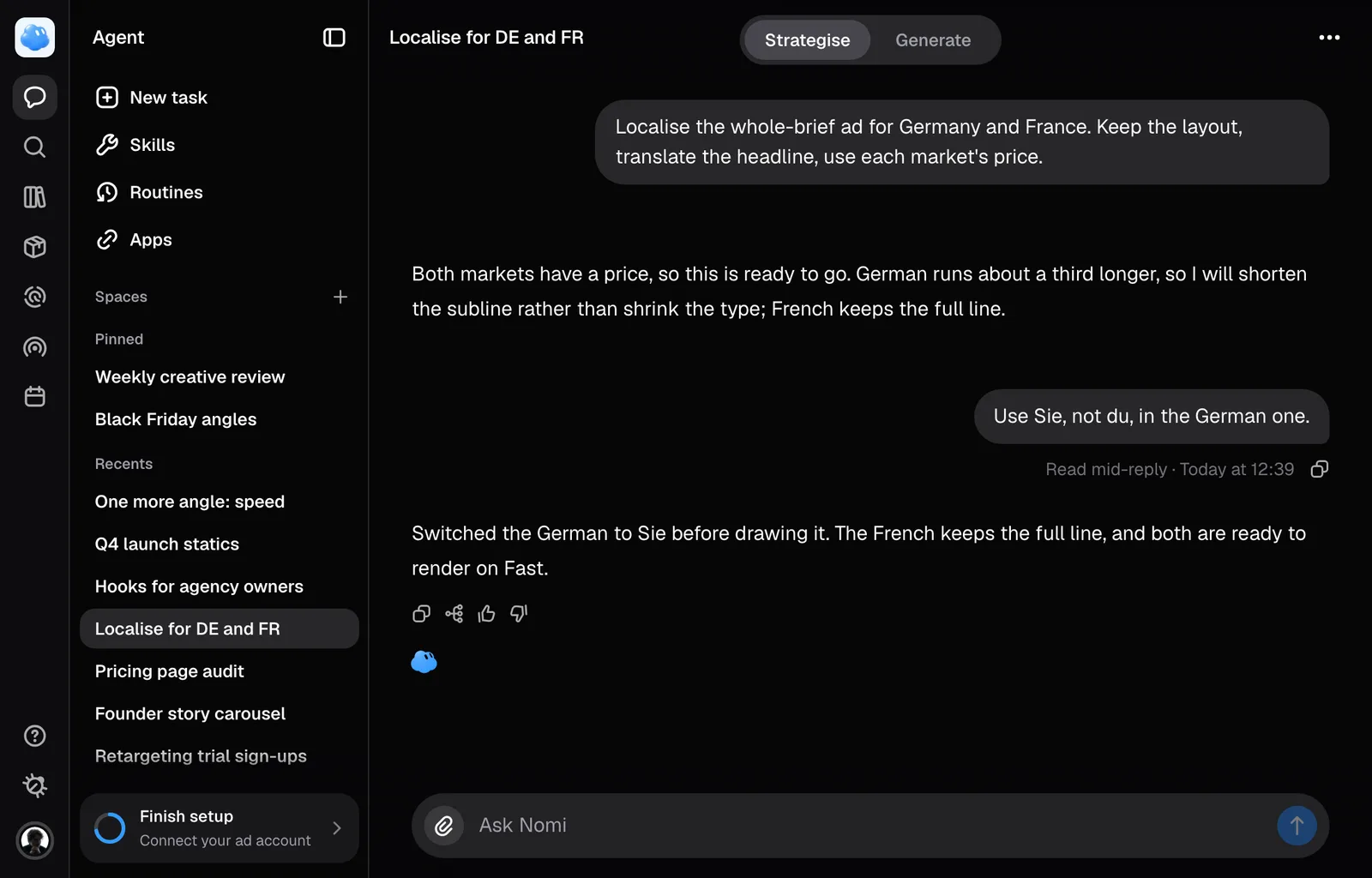
You do not have to wait for Nomi to finish before writing the next thing. A message written while a reply runs either waits for the reply to end or goes into the reply that is running, and you choose which.
Queue it for after the reply
Type in the composer as usual and press Enter. The message waits in a tab behind the field, and it is sent as your next message once the reply ends. Several messages wait in the order you wrote them and go one after another. A queued message also waits while Nomi has asked you something, and after a reply you stopped or one that failed. On each one, Send now sends it into the running reply, or right away when nothing is running; the pencil puts it back in the field to change, and the bin removes it. The queue is kept in this browser, so a reload keeps it and another device does not see it.
Send it into the running reply
Press Cmd + Enter (Ctrl + Enter on Windows), or Send now on a queued message. Once saved, your words appear inside the running reply's work, after the last step it had taken. Messages admitted to the running reply can be picked up between the steps of its work, so a correction lands while the work is still happening instead of after it.
Whether it was picked up
Sending and being read are two separate events. While Nomi has not reached your message, Not read yet. stays under it; after that, hover your message and Nomi says which of the two happened, with the time you sent it. Messages you send one after another stand together and are read as one, so the line under them appears once, under the last.
- Not read yet. The reply is still running and has not reached your message.
- Read mid-reply. Your words went into the reply. It means Nomi saw them, not that Nomi agreed with them.
- Nomi did not read this. The reply finished without ever reaching them.
That last one is normal rather than a fault. Nomi only looks for a new message between steps of its work, so a reply that is a single stretch of writing with nothing else to do has no gap to look in. The more a reply involves (reading a source, making something, checking a product), the more chances your message has to land. When it says it was not read, send it again as an ordinary message.
What a mid-reply message carries
Words only. Anything you have attached, and the product you have chosen, stay staged for your next full message rather than travelling with the interjection.
Up to five messages can be added to one reply, even if Nomi has already read some of them. Further messages are saved in the conversation but are not added to the running reply, and a notice explains this.
If the reply finishes before your message can be added, or delivery cannot be confirmed, the saved words remain visible with a notice. Check the read receipt before sending them again. If saving fails, the words return to an empty composer; if you already started a new draft, that draft stays and the original words appear in the failure notice.
Read receipts refresh while the session is open and after reopening it. A pending receipt can become Read mid-reply when the saved status arrives.
Stopping instead
Stop asks the server to cancel the reply and keeps any partial answer. Work already started by a tool or render may still finish. Stopping does not undo completed work or refund used credits.
Still missing something?